Build Log: The Webspenser Content Engine, a Blog Pipeline That Runs Every Week

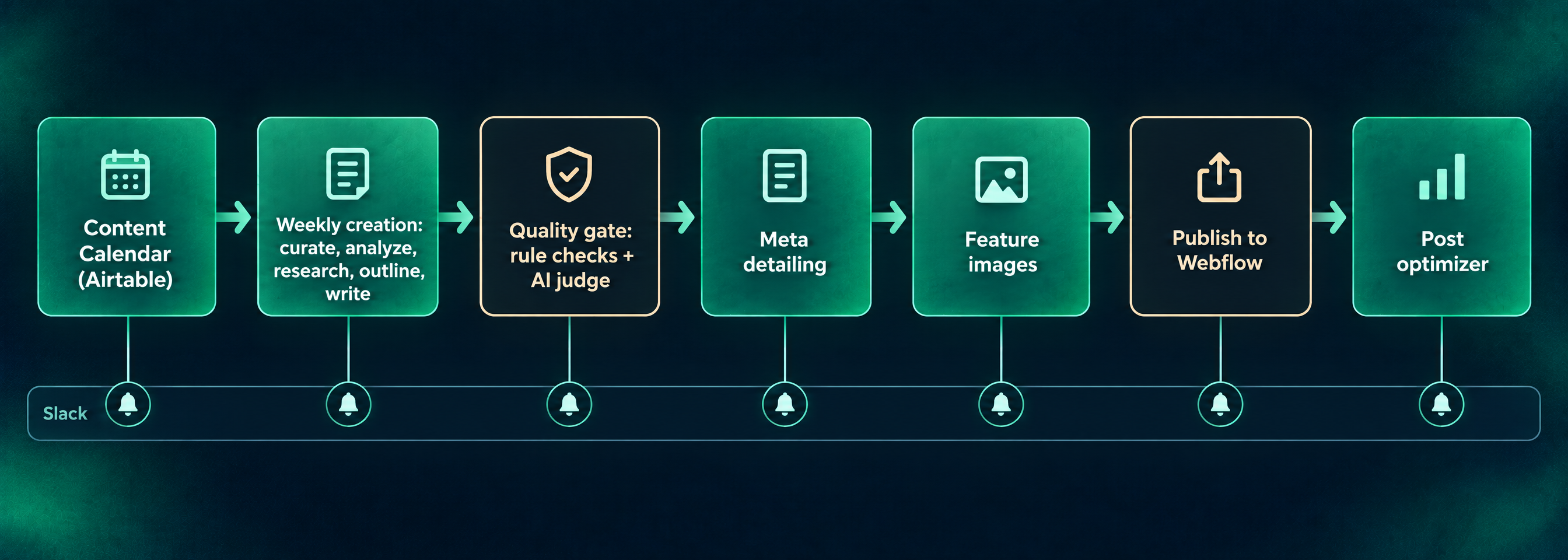
- A person owns the plan. The Airtable content calendar decides what gets written, and the pipeline only executes it.
- Each post type takes its own path through curation, analysis, research, outlining and writing.
- Every draft passes rule checks written in code, and a judge from a different AI family scores it. Every score is logged.
- Small finishing workflows handle metadata, images and publishing, and Slack tells us when something needs a person.
Every Monday at 8 a.m., a message lands in our blog content channel in Slack. Most weeks it says a draft is written, which checks it passed, and how an AI judge scored it. Some weeks it says the calendar is empty, or that this is a cornerstone week and the post is ours to write by hand. Either way, nobody at Webspenser had to remember to start anything.
That message comes from the Webspenser content engine, the system that plans, researches, writes, checks, illustrates and publishes our blog. Except for our cornerstone guides, every post on this blog has gone through it. It isn't a demo. It's the production system we run our own marketing on, and it's the kind of system we build for clients.
This is the content engine's Build Log. We update it as we ship, and the update log at the end says what changed. So far it covers late May to November 4, 2026: seven n8n workflows, one Claude skill, an Airtable base, and more prompt revisions than we can count. It focuses on the blog. Our social posts and our newsletter, The Human Factor, run on their own workflows.
What is the content engine?
The content engine is a chain of small automations, each with one job, that pass a post to each other through status fields in Airtable. n8n, an automation tool, runs them. It has five parts:
- Calendar. An Airtable Content Calendar holds every planned post: its type, category, scheduled date, funnel stage, and notes on what it's for. This is where our content strategy becomes a real content plan.
- Creation. A weekly workflow that curates sources, analyzes them, researches the topic, outlines, writes and copy edits the post.
- Quality gates. Rule checks written in code and an AI judge that grade every draft, with every score logged.
- Finishing. Separate workflows for metadata, feature images, inline images and publishing to Webflow, plus a Claude skill that polishes a post once it's ready to go live.
- Slack. A message at every handoff, and a separate channel for anything that breaks.
Airtable is the single source of truth. Every outline, research brief, draft and eval score lives on a record we can open, read and change.
Decision 1: Why does a calendar, not the AI, decide what to write?
Because strategy is the part we don't hand off. An AI can find a topic that's trending this week. It can't tell whether that topic fits our funnel, fills a gap in a category, or repeats something we said last month. So the plan lives in our Content Calendar, and the pipeline only carries it out.
Each calendar item carries more than a title:
- Post type and category. One of six types (Cornerstone, Satellite, Fundamental, Framework, Strategy, Build Log) and one of our six blog categories.
- Funnel stage. Whether the reader is just learning, comparing options, or ready to talk.
- Production notes and a perspective. What the post is meant to do for the business, and the position it should take.
Our cadence follows the newsletter. Newsletter weeks get one post, other weeks get two, and we take holiday weeks off. We tried a flat twice-a-week plan and dropped it, because a few useful posts beat a pile of AI content that says the same thing.
Every Monday at 8 a.m., the creation workflow looks for the next item marked Scheduled in the coming seven days. It skips cornerstones and lead magnets, which we write by hand. If a cornerstone is the only thing on the schedule, Slack says so and reminds us it still needs writing. If nothing is scheduled, Slack says that too, with a link to the calendar.
Hand-written posts have their own door. We drop a finished Google Doc into a Drive folder, and it lands in Airtable as a record, ready for the same finishing steps.
Decision 2: Why does each post type take a different path?
Because a post that argues a position needs different raw material than one that explains a concept. Before any writing starts, the workflow routes each post by its type:
- Strategy posts need curation: what people in the industry are saying right now.
- Satellite posts need their cornerstone, so they add a new angle instead of repeating it.
- Framework and Fundamental posts skip curation and go straight to analysis.
Curation
For Strategy posts, Apify (a web-scraping service) pulls recent posts from a hand-picked list of industry blogs, through their RSS feeds, and from a short list of subreddits. Both lists live in a Google Sheet, not inside the workflow, so adding a source is a one-line change. A filter keeps only items from the last 30 days and merges them into one block of curated content.
Reddit has one job here: showing what real owners worry about. It never becomes a source the post cites.
Analysis
A strategist prompt reads the curated content (or the cornerstone) and returns a structured digest: the strongest evidence, the counterarguments, the research questions still open, and one primary keyword picked from our keyword list.
Each post type gets its own lens. A Framework analysis looks at the options a reader is choosing between, the criteria for choosing, and where businesses get the decision wrong. A Fundamental analysis looks for what owners most often misunderstand, and is told not to surface setup steps. We teach judgment, not clicking.
Research
The research questions go to Perplexity's Sonar model, which searches the web as it answers. The brief aims for 600 to 900 words and favors analyst reports, government data, academic research and established trade groups. Social media and anonymous blogs are off the list.
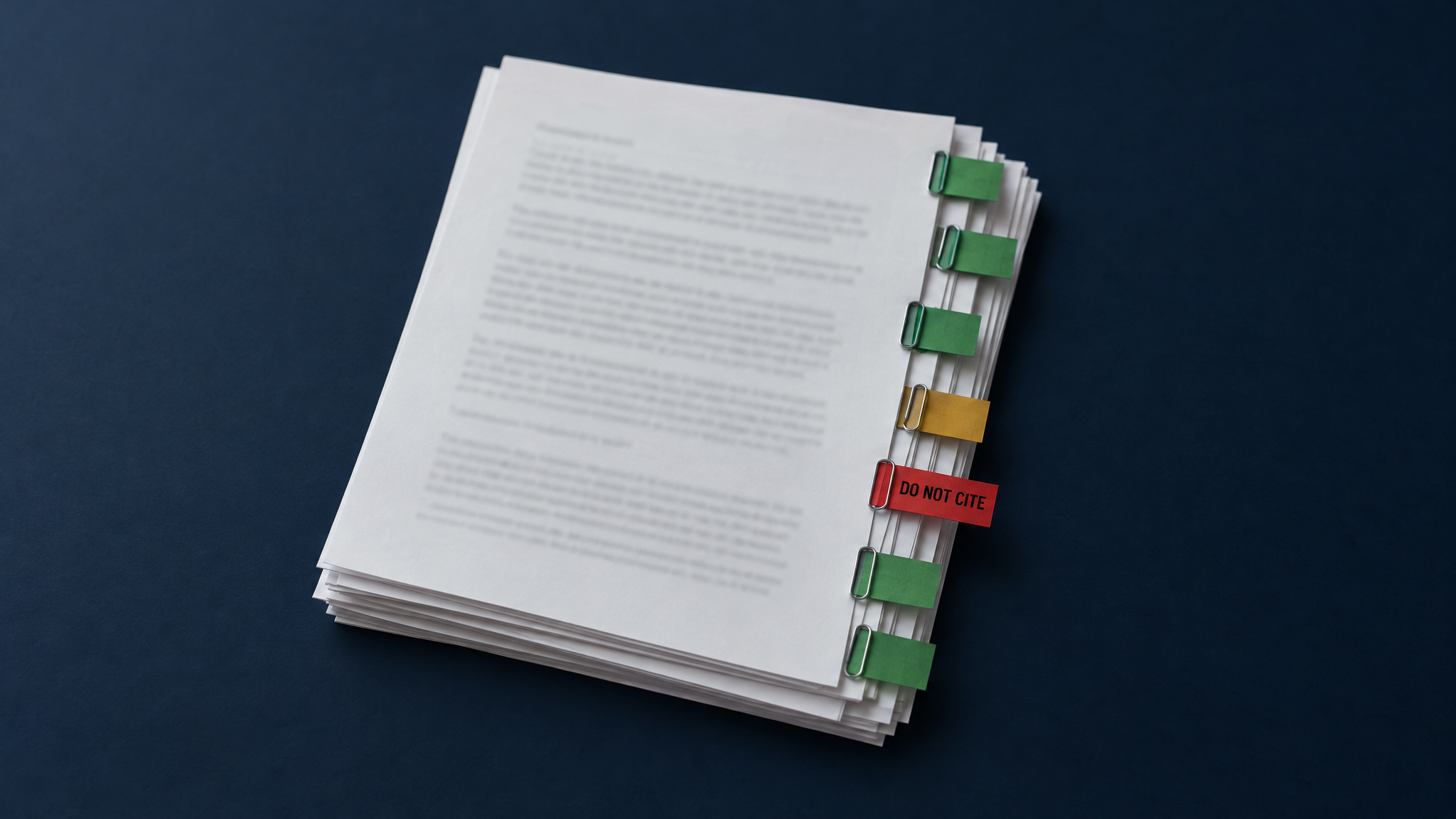
The sources are the interesting part. The brief's source list is built from the search results the API returns, not from links the model typed. Each source is then labeled: primary, press, non-US (cite only as an example), or secondary and vendor content marked DO NOT CITE. That label follows the source all the way to the quality gate.
Outline and draft
The outline prompt works in two passes. It drafts an outline, then reviews it for naturalness, value, flow, audience fit and keyword placement, and cuts any closing "Book a call" section. The call to action gets its own block on the page later.
The writer, Claude Opus, works in three passes: write, review the draft against an editor's checklist, then revise. It returns the post with self-edit notes that explain what it changed. A separate copy editor, Claude Sonnet with a fresh context, then makes one more pass for tone, plain American English, and the words we've banned.
Decision 3: Why does a different AI grade the writing?
Because a model grading its own work tends to like it. Our quality gate has two layers, and both run in one shared sub-workflow, so every draft, retry, copy edit and rewrite is held to the same standard.
The first layer is rules, checked by code. It handles anything a rule can settle:
- word count within a band for the post type (a warning past 10 percent, a failure past 15 percent);
- no H1, and no heading at the very top;
- no em dashes, no italics, and bold used no more than three times;
- every outside link points to a URL in the research brief's source list, and none to a source marked DO NOT CITE;
- exactly one internal link, chosen from our list of Webspenser pages;
- no (Source, Year) citations and no leftover markers like [3];
- the primary keyword in the first 100 words;
- no phrase from our banned list.
A draft that fails gets one automatic retry. The writer sees its own draft and the exact list of failures, and is told to change only what's needed to fix them. If it still fails, the post goes to REWRITE NEEDED with the failures written into its Editor Notes.
The copy editor sits behind the same gate. Its edit is kept only if it still passes every check and leaves the links and headings exactly as they were. Otherwise we keep the writer's draft and log the reason.
The second layer is an AI judge. GPT-5.6 Terra scores each draft from 1 to 5 on voice, reader fit, judgment over setup, use of evidence, structure and flow, and internal link fit. Rewrites get two more scores: whether the editor notes were addressed, and whether the parts that already worked were kept. We chose a judge from a different model family than the writer on purpose.
The rubric, thresholds and banned phrases live as tabs in our configuration sheet, so we tune them without touching the workflow. Every eval run, pass or fail, becomes a row in an Airtable Evals table.
The judge runs in shadow mode for now. It scores and logs, but only the rule checks can stop a post. After five logged runs, we'll look at how the scores spread and set minimums before the judge can block anything. A judge nobody has calibrated is a coin flip with a confident voice.
Rewrites
When a draft needs work, we write editor notes on the record and trigger a rewrite. The workflow saves the current body first, so the judge can compare before and after. A rewrite won't start without editor notes, an outline and research, because "make it better" isn't an instruction.
Decision 4: Why is the rest of the job split into small workflows?
Because each step fails in its own way, and we want to rerun one without rerunning everything. When a draft passes the gate, its status moves progressively through the workflow. We can pause a post at any step.
Meta detailing
An AI agent writes the SEO title (50 to 60 characters), meta description (140 to 155), slug, summary, key points and read time. Its one tool reads our existing Webflow posts, so it can confirm the slug is unique. If the record has no keyword, it stops and says so instead of inventing one.
A second prompt picks the call to action. It reads the post plus the calendar's production notes and funnel stage, then chooses one destination from our list. A reader who is just learning gets a free resource, a reader comparing options gets an assessment, and a ready buyer gets a booking link. It writes the headline, subheadline and button label, and records why it chose that destination.
Feature imaging
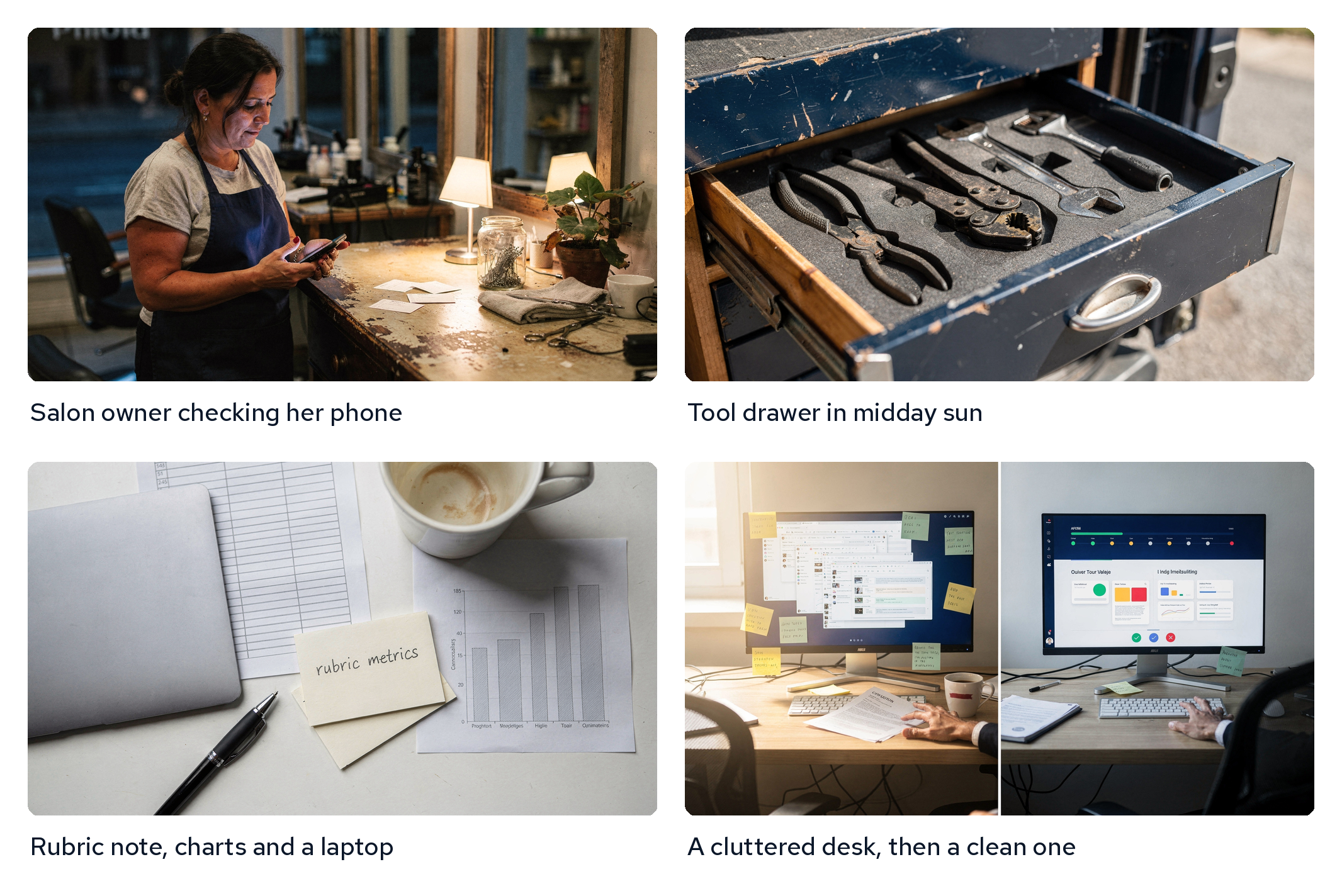
This step took the most iteration. Our readers are plumbers, HVAC techs, solar crews, lawyers and shop owners, so the images have to look like their real work, not stock photos of an office.
- A concept step proposes three ideas for the post, each in a different visual treatment (a workplace scene, a portrait, a moment mid-task, an object that stands for the idea), and scores how well each fits.
- Code picks one. It docks points from treatments and settings used in the last few images so the blog doesn't repeat itself, then assigns who's in the frame and what they're doing.
- An art direction step writes the final prompt, and an image model renders it.
- The workflow makes a thumbnail, builds the Open Graph image with RenderForm, and attaches all three to the Airtable record.
A separate inline imaging workflow adds images inside the body when a post needs them.
Publishing and the post optimizer
Publishing pushes the finished record into Webflow's CMS. Once a post is in Webflow and ready to go live, we run a Claude skill we call the post optimizer. It suggests internal links to related posts, pull quotes, bolding, paragraph breaks and subheads, and flags heading problems.
It never writes without approval. It returns a change report, we pick the changes we want, and it stages them in Webflow without publishing.
How does Slack keep a person in the loop?
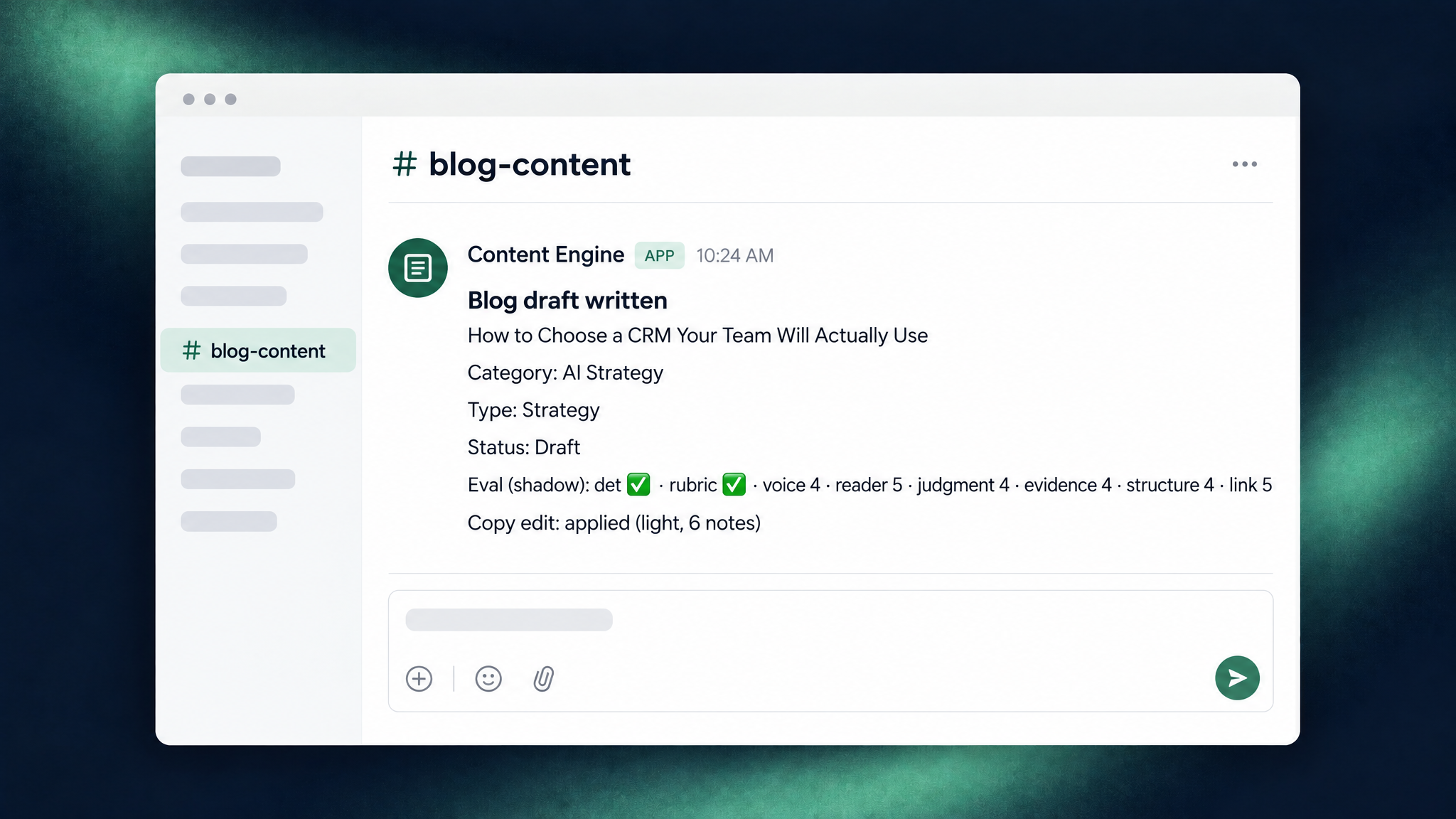
Every handoff posts to our blog content channel, and anything that breaks goes to a separate error channel. In a typical week we see:
- Draft written, or draft failed checks, with the post type, status, eval scores, whether the copy edit was kept, and any failures.
- Meta added, with the new meta description and a link to the Airtable record.
- Feature images generated, with the Open Graph image attached and the treatment, setting and subject that were used.
- No post scheduled, or a reminder that it's a cornerstone week.
- Content retrieval failed, when Apify can't fetch sources or a post type doesn't match a route.
Every n8n workflow also shares one error handler that posts to both Slack and Telegram, so a failure never sits unnoticed.
Slack is where we notice. The work happens wherever it needs to: Airtable to edit a draft or write editor notes, Claude to run the post optimizer or rework a prompt, Webflow to check the page. The automation does the repetitive work, and we keep the judgment calls.
What did we learn about prompts?
Most of our quality gains came from changing prompts, not adding nodes. Our rule is to change the prompt first and add structure only when a prompt can't fix the problem. These changes made the biggest difference:
- Ban made-up sources, then don't rely on the ban. The research prompt says never to invent a source or a URL. We still build the source list from the search results, because a rule in a prompt is a request, not a guarantee.
- Tell the writer how to cite. Older posts used (Source, Year) citations, which read like a term paper. Now the writer links a listed source inside the sentence, and the gate fails any parenthetical citation.
- Use the keyword the way a person would say it. Early titles read like stacked nouns, such as "AI safety compliance small business." Every prompt now uses the keyword's closest natural form, and only the slug uses it as is.
- Teach judgment, not setup. Our posts explain how to think through a decision, not which buttons to press. That rule appears in the analysis, outline and judge prompts, and it's one of the scores.
- Describe the reader. The copy editor writes for American owners in their 40s to 60s who are curious about AI and careful with it. It respects that caution, pairs any technical term with an everyday comparison, and strips out hype words.
- Move word lists out of the prompt. The banned phrases started inside the prompt text. Now they're one tab in the config sheet, shared by the copy editor and the gate.
- Say who's in the picture. When nobody is described, image models tend to fall back on the same default person. So code assigns an age, background and gender, varies them from post to post, and the prompt states them in plain words.
- Leave out what models draw badly. No phones in hand, no tape measures or gauge faces, no fine wiring, one tool at a time. Our images got more realistic when we asked for less.
- Put word counts in the brief. We tried working out targets with Airtable formulas, and they weren't reliable. Each post type's word range now sits in its brief and in the gate.
What broke along the way?
- Images vanished from Slack. Airtable attachment links expire within hours, so Slack previews went blank. The workflow now downloads the image and uploads the file itself.
- Published links were wrong. Our publishing workflow saved live URLs without the /post/ path. We fixed the step and corrected every record.
- One item became every item. In one n8n run mode, a reference that looks like it reads each item quietly reads only the first. We now loop over every item explicitly.
- The copy editor got creative. It sometimes moved or dropped links while fixing tone. That's why its edit now has to keep links and headings exactly as they were.
- The first eval run disagreed with us. The rubric's "exactly one internal link" rule clashed with a rewrite where we had asked for more links. Settling cases like that is why the judge is still in shadow mode.
What has it done for the blog?
It made a steady schedule possible. Posting used to depend on whether we had a free afternoon. Now a draft is waiting on Monday, and our time goes to reading, editing and approving.
Search traffic to our posts is still small, but it has been climbing since the schedule became steady.
More posts didn't do that on their own. Consistency did, along with the checks that keep each post accurate and on topic.
What's still hard?
- The judge doesn't block anything yet. Until we set minimums, a post that reads poorly but passes the rule checks still reaches review.
- Checks prove rules, not insight. Code can count words and verify links. It can't tell whether a post says something worth reading. That's still our job.
- Cornerstones are written by hand. Our longest guides need more judgment and back-and-forth than the pipeline handles well today.
- Source lists go stale. Blogs stop posting and subreddits drift, and checking the list is still a manual chore.
- Images still need a look. Most renders are usable. Some poses still look staged to a working tradesperson, and we regenerate those.
Why does this matter for a small business?
You may never need a blog pipeline. But the pattern under it fits a lot of work: a plan a person owns, a chain of small automations that each do one job, checks that catch mistakes before a customer sees them, and a message when something needs you. The same shape works for proposals, monthly client reports, review replies and job follow-ups.
A system like this fits when the same kind of work gets done by hand every week, the information for it already lives in your tools, and a mistake in front of a customer would cost you. If marketing is where you'd start, our guide to staying visible between referrals covers where AI helps and what should stay with you.
Frequently Asked Questions
Does AI write all of your blog posts?
AI writes the first draft of most of them. A person sets the plan, reads every draft, writes the editor notes, and approves what gets published. Our cornerstone guides are written by hand.
Will Google penalize AI-assisted content?
Google's guidance says it looks at whether content is helpful and accurate, not how it was drafted. That's why so much of this pipeline is about sources, checks and human review.
Can you build a system like this for my business?
Yes. We build content and reporting systems in accounts you own, such as your own n8n, Airtable and website, so you keep what we build. We shape the checks around your voice, your sources, and the mistakes you can't afford.
Want a content system like this built for your business? Book a discovery call and tell us what you write by hand every week.
Update log
- November 4, 2026: first draft, covering the blog pipeline from late May to November 4, including the eval workflow added on October 27.
Want a Content System Like This Built for You?
Tell us what you write by hand every week. We'll scope a system that drafts it from your plan, checks it, and asks you before anything goes out.

More from the blog
Keep reading and learning

Every other Tuesday, one short email. A real moment from a small business, why people act that way, and the automation that handles it. Three minutes. No jargon, no hype.