Build Log: Agent Builder, and AI Agents That Earn the Right to Run Alone

- You can trust an AI agent because of how it's built, not how it's prompted. The rules that matter most are checked by code before each call to your tools, and anything unclear is blocked.
- An agent may run on a schedule only when the rules it depends on are enforced that way, or when the owner knowingly accepts one of a few allowed exceptions.
- An agent is a folder of plain text you can read, kept apart from your own business data, so updates never touch what's yours.
- Failing closed is the right default, and it will sometimes stop a run you wanted. Our first scheduled runs proved both.
The first time one of our agents tried to do something it shouldn't, nothing happened. That was the point. In late September 2026, we told Sales Partner, our first agent, to approve one of its own outreach drafts through a live Attio CRM. The request never reached Attio. A small check that runs before every call to a connected tool saw a status the agent isn't allowed to write, and blocked it.
That check is part of Agent Builder. We built Agent Builder for curious business owners who want to try making their own agents, safely. Building an agent is easy now. Building one that works inside your real tools without doing something you didn't intend is harder. Agent Builder builds in the best practices and guidelines we wish we'd had, and gives you a mental model and a framework for thinking an agent through. It's like using a skill for building skills, a guided setup helps you reason through the different elements of building an agent that suits your business needs.
This is Agent Builder's Build Log. We update it as we ship, and the update log at the end says what changed. So far it covers September 1 to November 4, 2026: 272 commits, and seven major versions of the Agent Standard.
What is Agent Builder?
An agent is a helper that handles a bounded job in your business, it has reasoning ability provided by an AI model and access to the real tools you do your work in every day. Agent Builder is the standard and toolkit we use to build them, and it has three parts:
- the Agent Standard, which sets how an agent is packaged and how its rules are enforced;
- a validator that checks every agent release against the standard;
- a wizard that interviews you and builds a new agent. It walks you through the agent's goal, whether it needs helpers (subagents) for separate parts of the job, which of your tools it connects to, and what it must never do.
Our first agent built with it is Sales Partner, which finds and researches sales leads into a CRM. It has its own build log. That's how Webspenser works in general: we're here to be helpful, and Agent Builder is the tool we wanted for ourselves.
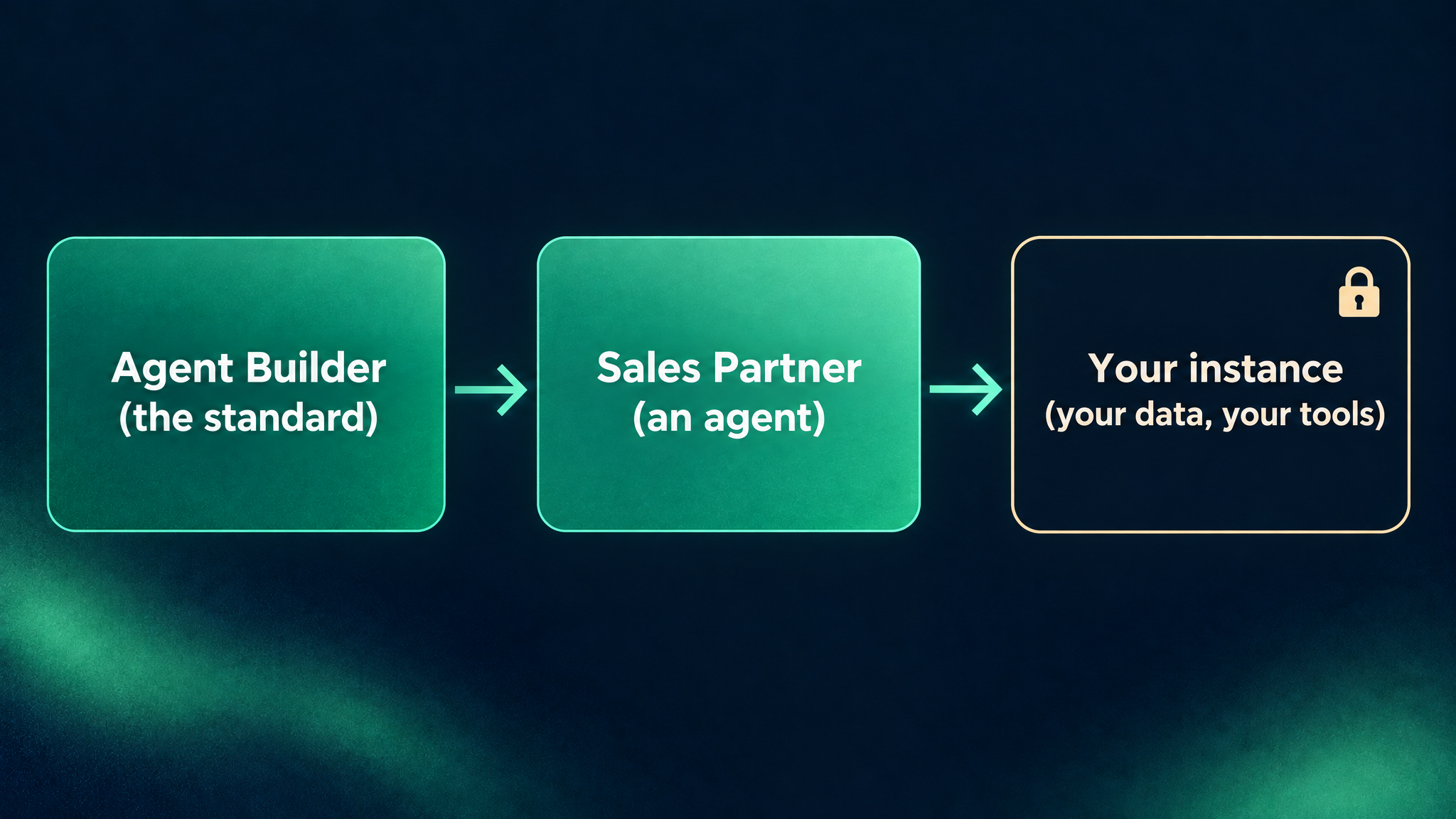
Decision 1: Why is an agent just a folder of plain text?
Owners ask early what exactly is this thing doing? A folder you can open answers that. An agent built with Agent Builder is a set of markdown files: an AGENT.md that says who it is and how it works, skills for the steps it repeats, and tests that spell out what it must never do. There's no server to deploy. It runs inside Claude Code, Anthropic's AI assistant for working with files and tools.
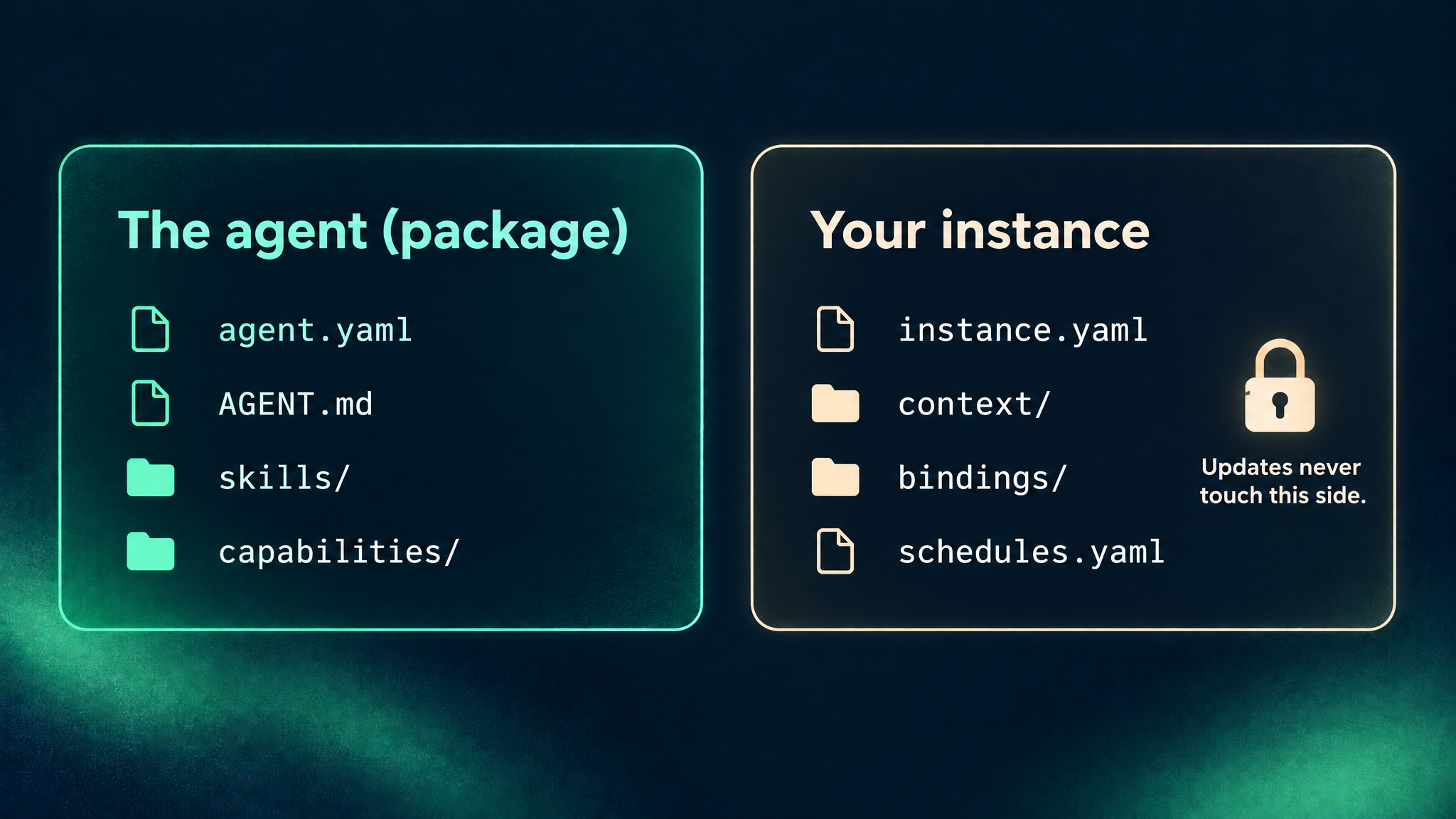
The split that matters is between the package and the instance:
- The package is the agent itself. It installs and updates like an app plugin, and you never edit it.
- The instance is your folder, ideally in a private git repository so every change is tracked. It holds your business profile, your goals, and which tools you've connected.
Updates never touch your folder. If you stop using an agent, your data stays in your own tools. Passwords and API keys go in neither folder. They stay in your tool connections.
Decision 2: Why do an agent's rules live in code, not in its prompt?
A prompt is a request, and a guard is a lock. "Never email a customer" written in an instruction is still a request. We wanted the important rules to hold even when the agent misunderstands, gets confused by a strange web page, or makes a mistake.
So every agent declares invariants: statements that must always be true, such as "never deletes records" or "only ever emails the owner". Each kind of tool an agent needs (a CRM, owner notifications, a run log, a web scraper) has a contract that lists its operations and invariants. You connect the contract to the system you actually use, so switching from one CRM to another means connecting a different tool, not rewriting the agent.
Every tool then ships a small policy file, and a guard checks every call against it before the call happens. Here's a trimmed version of the policy for Resend, the email service Sales Partner uses to send its owner a weekly digest:
covers: [owner_only_send]

allow: [send-email]
deny: ["*batch*", "*broadcast*", "*contact*", "*delete*"]

recipients:
  - tools: [send-email]
    at: [to, cc, bcc]
    bound: recipient_email   # the owner's address, fixed at setup

refuse_args: [replyTo, headers, scheduledAt, attachments]
In plain words:
coversnames the invariant this policy enforces: email goes only to the owner.allowlists the only calls the agent may make. Anything else is blocked, including tools the vendor adds later.denyalways wins.recipientschecks every address on every send against the one set at setup.refuse_argsblocks settings that could quietly redirect a message, such as a different reply-to address or extra headers.
The guard also fails closed. If the check is missing, crashes, or can't read the input with certainty, the call is blocked. A broken safety check should stop the agent, not wave it through.
We're honest about the line, too. Each agent's documentation says which promises the guard enforces and which the agent follows by instruction, because some rules can't be seen from a single call.
Decision 3: When is an agent allowed to run on its own?
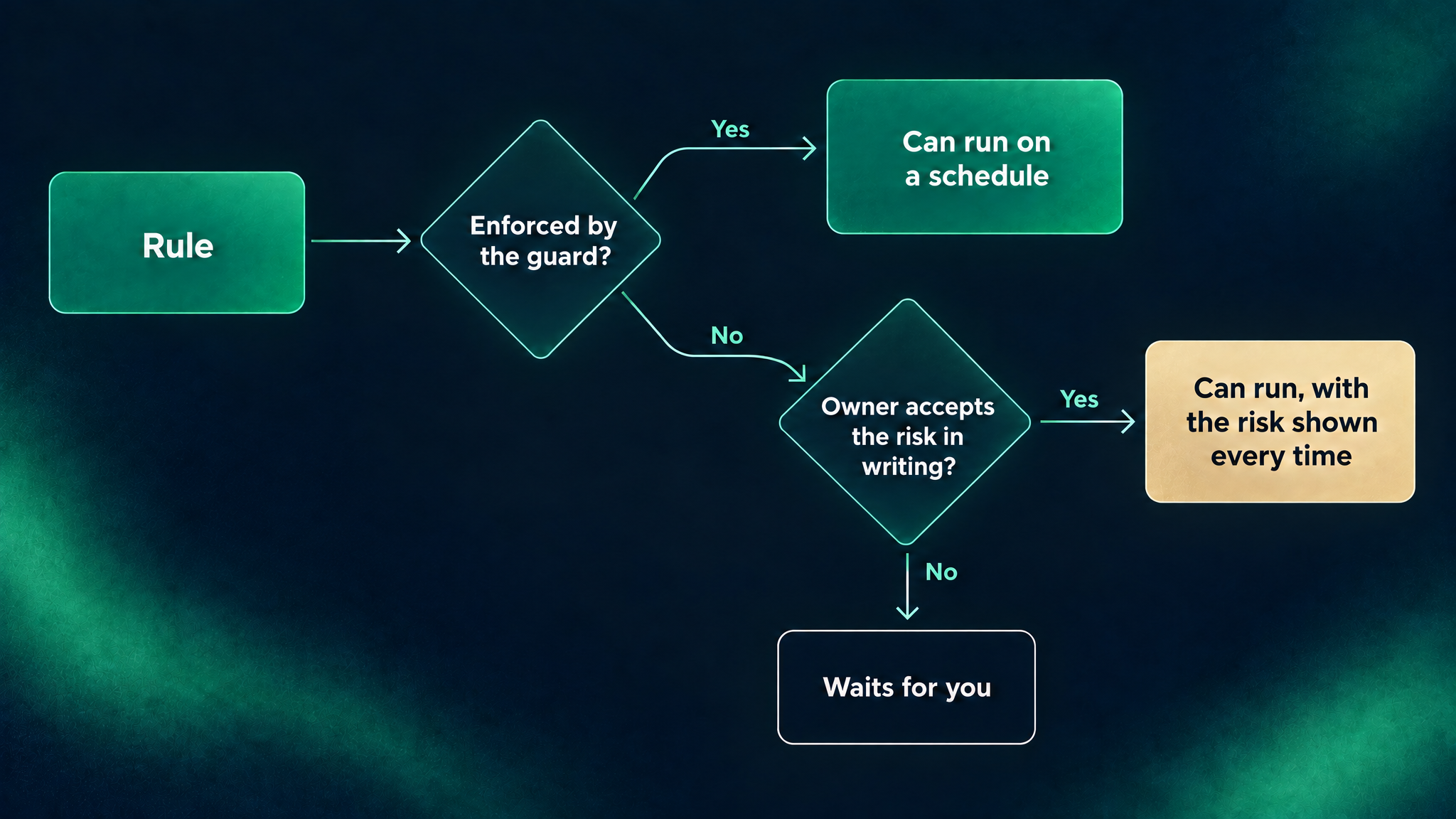
Only when the rules it depends on are enforced by the guard. We call that unattended-safe. If a rule is held only by instructions, the agent can't be scheduled, and it waits for a person.
Scheduled runs are Claude cloud routines, jobs that run on a timetable with nobody at the keyboard. Before one is created, a check compares each activity's rules with what the connected tools' guards actually enforce. Any gap blocks the schedule.
Some rules can't be checked one call at a time. "Only enroll leads the owner approved" depends on a stage stored in the CRM, which a call to an email platform doesn't carry. For rules like that, setup explains in plain words what could go wrong, records the owner's acceptance only if they agree, and prints it on every later check. Some rules can never be accepted this way. "Never contact anyone outside the business" has no exception.
Since Agent Standard 7.4, an activity can also list optional tools. If you haven't set one up, the schedule passes and the agent skips that step. If you have, it's held to the same rules as a required tool. That let Sales Partner add a paid search service without making every business sign up for it.
You don't switch autonomy on. The agent earns it, one rule at a time.
Decision 4: Why does every agent leave receipts?
An agent you leave running has to show you what it did. Agents built with Agent Builder can record each run in a log in your own Airtable base. Its guard lets the agent add rows but never change or delete them, or change the table's layout, so past entries can't be quietly rewritten. The log also gives an agent memory between runs, and a record of what each run cost.
What broke when we turned on scheduled runs?
On October 26, a scheduled Sales Partner run on Webspenser's own instance stalled at its first web-scraping call. The guard blocked every scraping call and every email to the owner. It was failing closed, as designed, for a reason we hadn't planned for.
Some tool settings are pinned: the owner's email address, how much a scraper may fetch. Before using a tool with pinned settings, the guard confirms they match the copy pushed to the business's git repository, so a setting can't be changed on one machine without a trace. On a laptop, that worked. A cloud routine's copy of the repository had nothing to compare against, so the guard treated "can't tell" as "no". Agent Builder 7.3.1 and 7.3.2 taught it where to look in a cloud checkout.
The same day exposed a second problem. The cloud environment caches the installed agent, so a run could quietly use an older release than the one the schedule was set up for. Now the schedule records its agent version, and a cloud run whose loaded agent doesn't match is blocked, with a message naming the line to change. Since those fixes, Sales Partner's scheduled runs have completed successfully.
What's still hard?
A build log that only lists wins isn't worth much. Here's what's still open:
- Upgrades are still manual. A cloud run can't use the wrong version unnoticed anymore, but moving to a new release still means editing the environment and re-running the schedule.
- The guard sees one call at a time. That makes it simple and reliable, and it's also its limit. It can check that a web address is public and secure, not that the site belongs to the business being researched. In principle, a crafted address could carry a little data out inside itself.
- The guard covers the agent's own workspace. It runs on calls made through connected tools in the business's instance folder. A session started somewhere else isn't covered.
- No full re-check at the start of each run. The full check runs when a schedule is created, so some later changes aren't caught.
- Compliance. Email and privacy laws such as CAN-SPAM, GDPR and TCPA aren't built into the standard yet. Sales Partner sidesteps most of this by never contacting anyone, but the next agent may not.
Where is Agent Builder headed?
One standard, many agents. Every new agent starts with the guard, the scheduling check and the validator in place, and can add the run log, without rebuilding any of them.
- Next: a customer onboarding agent. Once a deal is signed and the invoice is paid, it sends the welcome emails, puts the new customer into the right systems, and creates their projects, so work starts smoothly. It will be our first agent that emails someone other than the owner, which is why compliance is near the top of our list.
- Bring your own tool. If your software has no way for an agent to connect, we wrap it in a small n8n workflow (n8n is an automation tool) that exposes a few fixed actions the guard can check.
- Or let us run it. Webspenser designs, sets up and runs these agents for small businesses as part of our AI managed services.

Should you build your own agent?
Agent Builder fits when a repeating job eats hours every week, the work lives in tools you already use, you can name what the agent must never do, and you want to stay the one who says yes. If you're curious and like to tinker, the wizard will walk you through it. Unsure where an agent would help most? Our AI readiness audit walks through it.
Frequently Asked Questions
Do I need to be a developer to use Agent Builder?
No, but you'll be working in Claude Code, which runs in a terminal or a desktop app. The wizard asks plain questions about the job, your tools and your rules, then writes the agent's files and tests. You'll want to read what it writes, since a folder you can read is the point.
Can a malicious website trick an agent?
A web page can contain text designed to confuse an AI, which is why the rules that matter don't depend on the agent's judgment. The guard checks each action an agent takes through its connected tools, so even a confused agent can't break a guarded rule through them. The gaps that remain are listed under "What's still hard?" above.
Want an agent built for your business? Talk to us about Agent Builder. Or look under the hood: it's open source at webspenser/agent-builder.
Update log
- November 4, 2026: split from a combined post. Sales Partner now has its own build log. Covers Agent Standard 1.0 to 7.4.
- October 21, 2026: first draft, combined with Sales Partner, covering September 1 to October 19.
Want an Agent Built for Your Business?
Tell us the job that eats your week. We'll scope the agent, its rules, and what it must never do, then build it on the same standard we use ourselves.

More from the blog
Keep reading and learning



Every other Tuesday, one short email. A real moment from a small business, why people act that way, and the automation that handles it. Three minutes. No jargon, no hype.